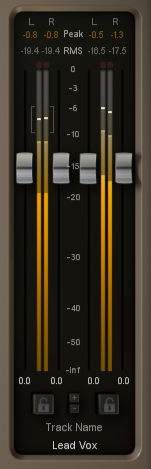
Nectar ’s level meters display the input and output level for the left and right channels as your audio enters and exits Nectar. You can set options for the Input/Output meters by opening the ‘I/O’ tab of the Options menu.
Peak
The Peak meter is a fast meter that measures the instantaneous maximum sample value of your signal. If you are tracking the peaks for possible clipping, the Peak meter is an appropriate choice.
RMS
RMS (Root Mean Square) is a software-based implementation of an analog style level meter. The RMS meter displays the average level calculated over a short window of time. The result is a meter that is appropriate if you are interested in tracking the overall loudness.
RMS + Peak
This is a combined RMS and Peak meter. This meter displays a lower bar representing the average level (RMS) and a higher bar representing peak level. There is also a moving line above the bar representing the most recent peak level or peak hold.
Peak Hold
By default, the meters will temporarily hold the peak values of your incoming audio.
Clipping
Above the meter is a red LED that serves as a clipping indicator. If the level exceeds 0 dB at any point, this LED will light up and remain lit until you double-click anywhere on the LED itself.